301 Redirecting Expired Domains: Successes and Pitfalls
Explore the nuances of 301 redirecting an expired domain to your site. Learn what works, what fails, and how to avoid common SEO risks.

Introduction
Redirecting an expired domain to your site using a 301 redirect can be a powerful SEO strategy. When executed correctly, it can enhance your site's authority and traffic. However, not all expired domain 301 redirect SEO efforts yield positive results. Understanding what works, what fails, and what to avoid is crucial.

Why Redirecting Expired Domains Matters
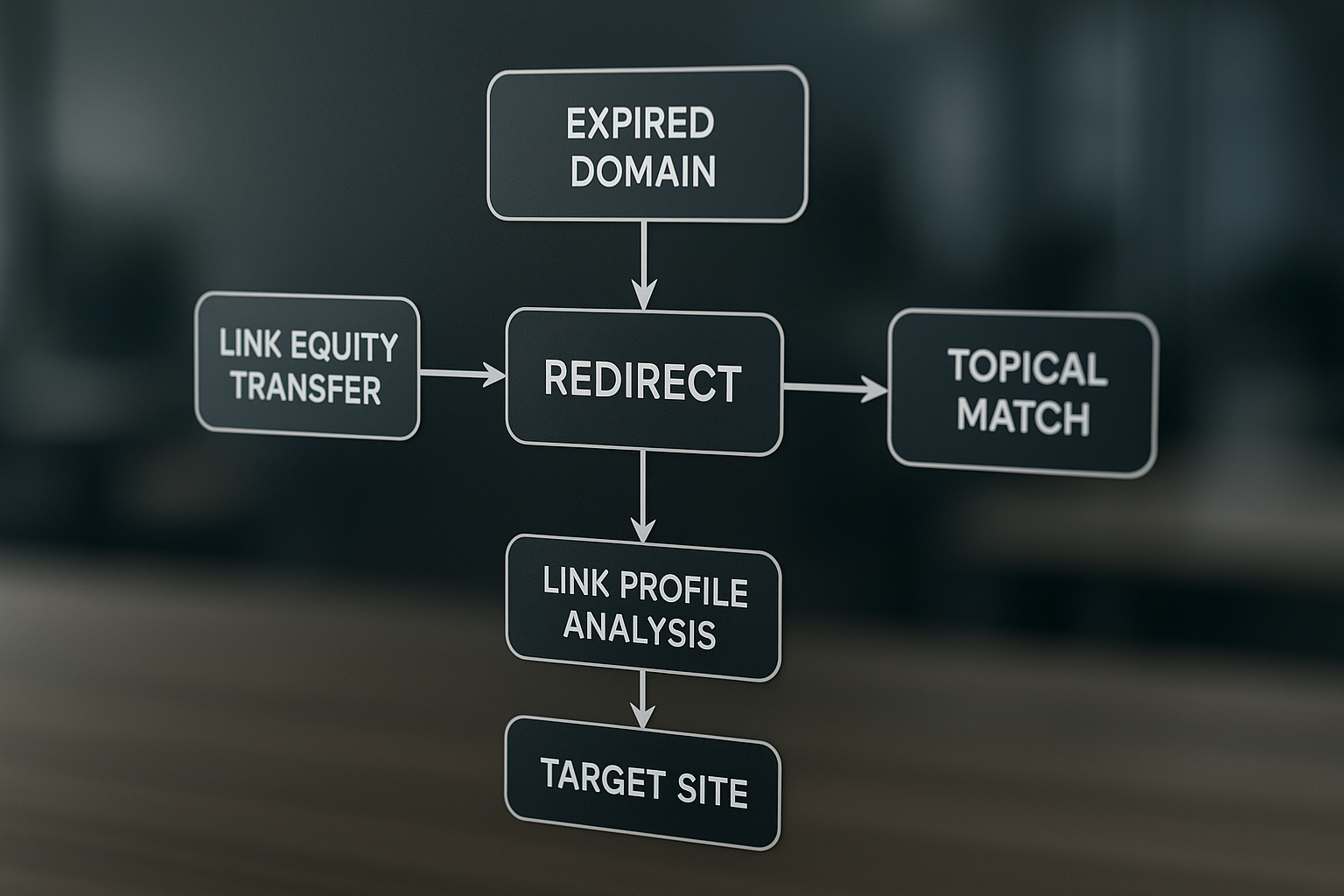
Redirecting expired domains can transfer valuable link equity to your site, boosting your search engine rankings. A tight topical match and a clean link profile are essential for success. These factors ensure that the redirected domain aligns with your site's content and audience.
How to Evaluate Expired Domains Safely
- Check for a tight topical match: Ensure the expired domain strongly relates to your niche.
- Analyze the link profile: Use tools to verify the absence of spammy links.
- Inspect anchor texts: Look for natural, relevant anchor texts.
- Evaluate historical content: Review archived content for relevance.
Common Mistakes to Avoid
- Mismatch in content: Redirecting domains with unrelated content can confuse search engines.
- Spammy anchors and backlinks: These can lead to penalties rather than benefits.
What to Do After Redirecting
Consider rebuilding key pages from the expired domain on your site. This helps retain valuable content and leverage the domain's existing authority. Gradually roll out redirects and monitor their impact on your site's performance.
Next Steps
Explore our domain marketplace for premium and featured domains that align with your site's objectives. For more insights, visit our blog index.
FAQ
-
What is a 301 redirect? A 301 redirect is a permanent URL redirection from one web address to another, indicating a page has moved permanently.
-
Can any expired domain be redirected safely? Not all expired domains are suitable for redirection. Ensure a tight topical match and a clean link profile to avoid SEO risks.
-
What are common mistakes with expired domain redirects? Common mistakes include redirecting domains with spam anchors or irrelevant backlinks which can harm your SEO.
-
How can I monitor the success of a redirect? Monitor redirects by tracking changes in site traffic and keyword rankings, and use analytics tools to assess performance.
-
Are there alternatives to redirecting an expired domain? Yes, consider rebuilding the content on the expired domain and redirecting selectively to relevant pages on your site.
Explore Premium Domains
Domains You Might Like
aeostrategy.com
aeostrategy.com is a compelling choice for a consulting firm or service specializing in strategic planning and business optimization. This domain effectively conveys a sense of expertise and direction, making it ideal for companies that assist businesses in navigating complex environments and achieving their objectives. Whether the focus is on marketing, operations, or corporate strategy, aeostrategy.com positions itself as a leader in providing insightful and actionable solutions. The target audience for this domain includes businesses of all sizes seeking to enhance their strategic initiatives and competitive edge. From startups looking to establish a market presence to established corporations aiming to streamline operations and innovate, aeostrategy.com appeals to decision-makers who value expertise and foresight in their strategic partners. As a brand, it promises clarity, precision, and a results-oriented approach, making it a robust platform for consulting services that drive business success.

aishopper.com
Step into the future of shopping with aishopper.com, a domain meticulously crafted for the evolving landscape of e-commerce. This premium domain is perfectly positioned for businesses looking to leverage artificial intelligence to revolutionize the shopping experience. Whether you are launching a cutting-edge AI-driven shopping assistant, a predictive pricing tool, or an innovative recommendation engine, aishopper.com offers an unforgettable brand identity that resonates with tech-savvy consumers and forward-thinking enterprises. Its concise and intuitive name ensures that your brand stands out in a crowded digital space, while its relevance to the AI and shopping sectors creates significant opportunities for growth and engagement. Ideal for startups and established companies alike, aishopper.com is a versatile, memorable, and market-ready domain that promises to capture the imagination of a global audience. Its seamless integration of AI with shopping not only highlights the domain's innovative edge but also aligns perfectly with the current trends in digital commerce. As consumers increasingly turn to technology for personalized and efficient shopping experiences, this domain offers the perfect platform to build a brand that embodies the future of retail. Secure aishopper.com today and position your business at the forefront of the AI and e-commerce revolution.

a9devs.com
Introducing a9devs.com, a dynamic and versatile domain name that perfectly encapsulates the innovative and often misunderstood realm of the gray market. With 'A9' symbolizing the sleek and sophisticated hue of gray, this domain is ideally suited for businesses and developers seeking to make their mark in this niche industry. The gray market, known for its unconventional yet highly impactful commerce activities, offers unique opportunities for technology firms specializing in solutions that navigate and capitalize on these less-explored avenues. a9devs.com is not only memorable and brandable but also an ideal fit for tech startups, consulting firms, or e-commerce platforms aiming to revolutionize gray market transactions. Harness the power of a9devs.com to position your business at the forefront of innovation in the gray market. This domain offers a compelling opportunity for businesses to build a strong digital presence that resonates with savvy consumers and tech enthusiasts alike. Its concise and catchy nature makes it an ideal choice for marketing campaigns, ensuring your brand will stand out in the competitive landscape. Elevate your business with a9devs.com, a domain that embodies forward-thinking and adaptability, and unlock new potential in the tech-driven gray market sector.